Examples
To report issues to the console the Console report format needs to be imported. The examples use the MsBuild and SARIF issue providers to read issues:
#addin nuget:?package=Cake.Issues&version=6.1.0
#addin nuget:?package=Cake.Issues.MsBuild&version=6.1.0
#addin nuget:?package=Cake.Issues.Sarif&version=6.1.0
#addin nuget:?package=Cake.Issues.Reporting&version=6.1.0
#addin nuget:?package=Cake.Issues.Reporting.Console&version=6.1.0
Note
In addition to the Console report format the Cake.Issues and Cake.Issues.Reporting core addins need to be added.
<Project Sdk="Cake.Sdk">
  <PropertyGroup>
    <TargetFramework>net9.0</TargetFramework>
    <RunWorkingDirectory>$(MSBuildProjectDirectory)</RunWorkingDirectory>
  </PropertyGroup>
  <ItemGroup>
    <PackageReference Include="Cake.Frosting.Issues.MsBuild" Version="6.1.0" />
    <PackageReference Include="Cake.Frosting.Issues.Sarif" Version="6.1.0" />
    <PackageReference Include="Cake.Frosting.Issues.Reporting.Console" Version="6.1.0" />
  </ItemGroup>
</Project>
<Project Sdk="Microsoft.NET.Sdk">
  <PropertyGroup>
    <OutputType>Exe</OutputType>
    <TargetFramework>net9.0</TargetFramework>
    <RunWorkingDirectory>$(MSBuildProjectDirectory)</RunWorkingDirectory>
    <ImplicitUsings>enable</ImplicitUsings>
  </PropertyGroup>
  <ItemGroup>
    <PackageReference Include="Cake.Frosting" Version="6.2.0" />
    <PackageReference Include="Cake.Frosting.Issues.MsBuild" Version="6.1.0" />
    <PackageReference Include="Cake.Frosting.Issues.Sarif" Version="6.1.0" />
    <PackageReference Include="Cake.Frosting.Issues.Reporting.Console" Version="6.1.0" />
  </ItemGroup>
</Project>
Console Output Examples
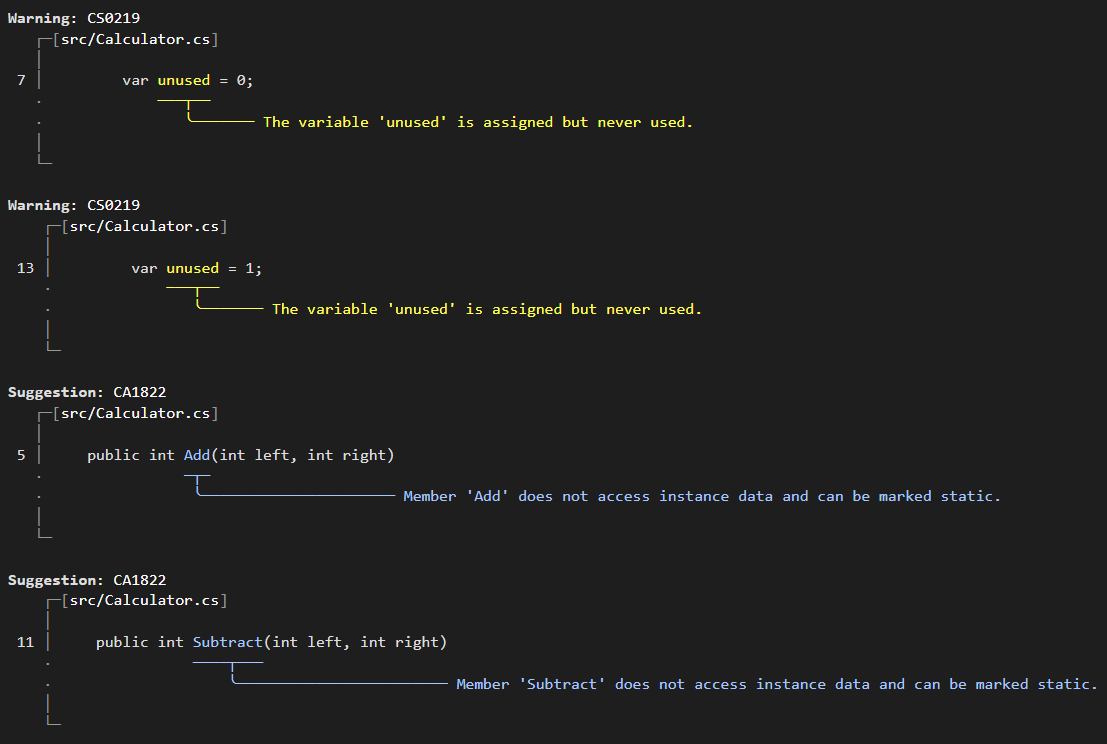
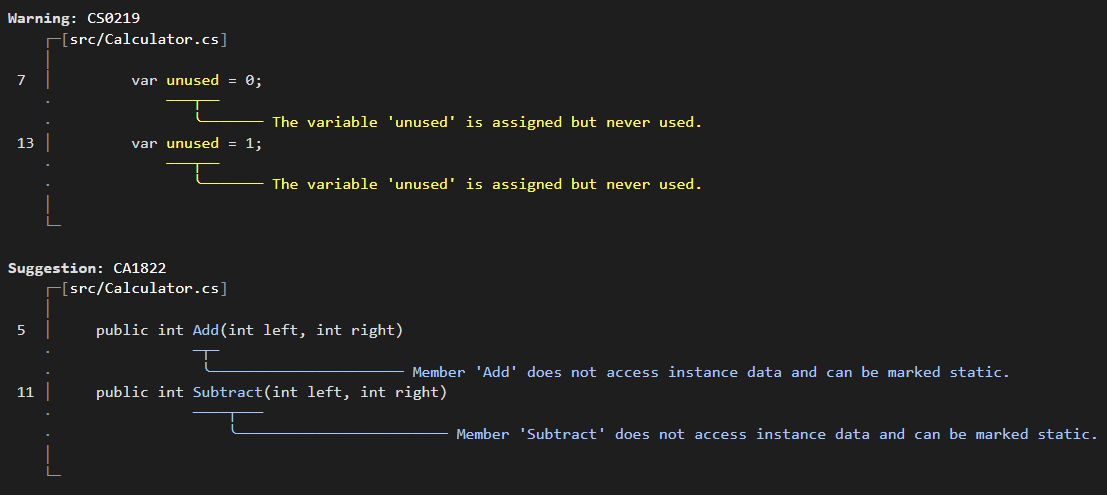
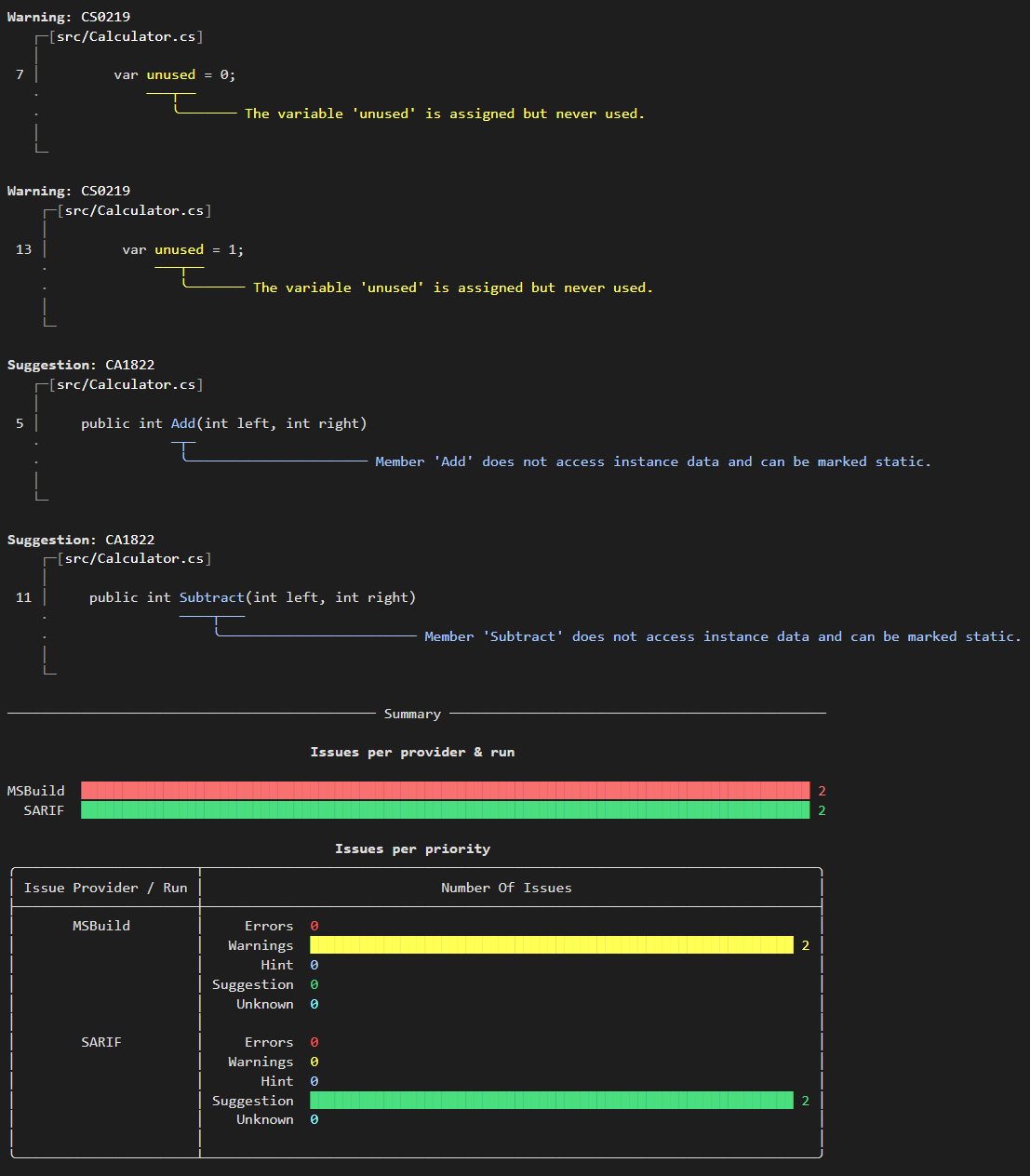
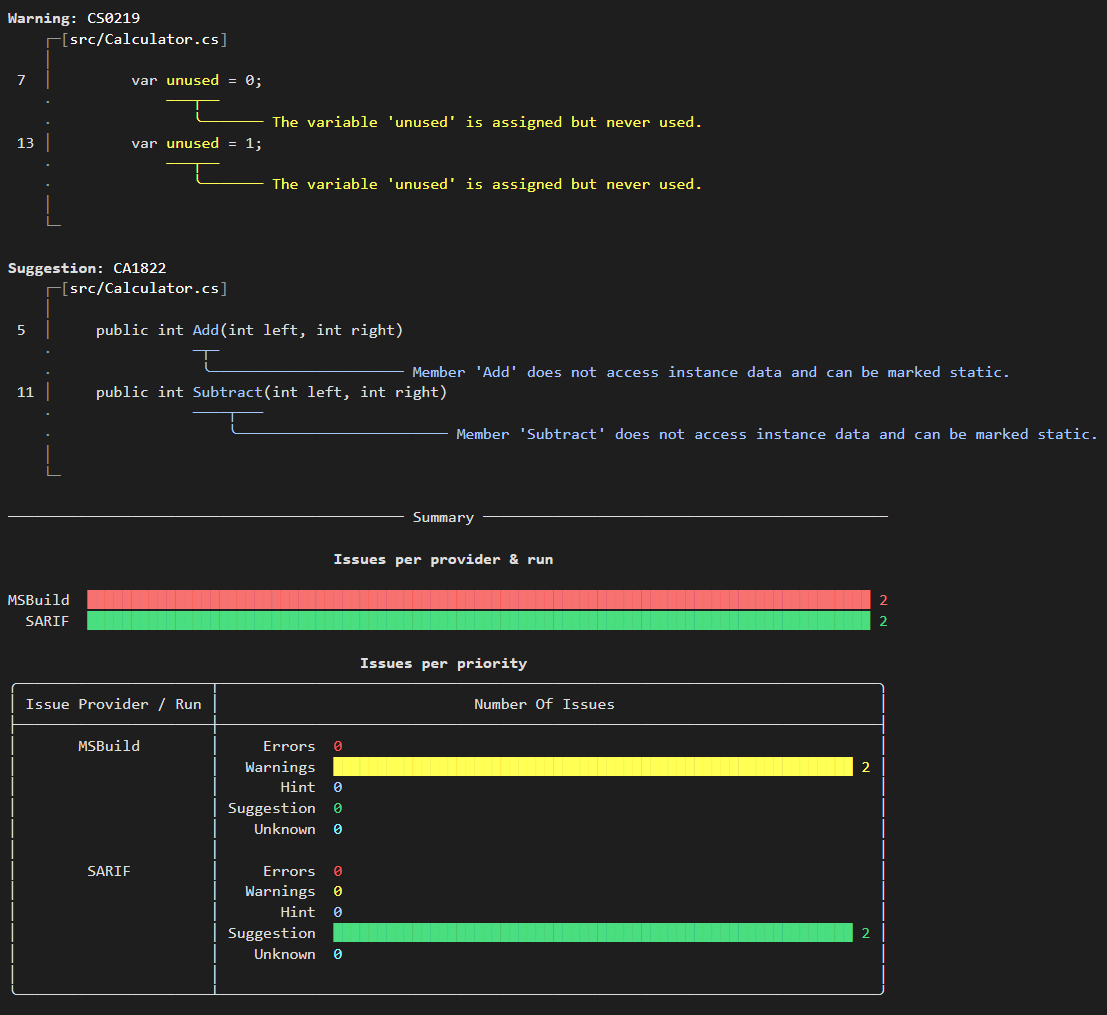
The Console report format can be configured with various settings to customize the output. It renders an issue only when its affected source file exists and the issue has a line and column. The screenshots use valid source locations and show both MSBuild warnings and SARIF suggestions.
Default Settings
By default, the Console report format shows individual diagnostics for each renderable issue:
Grouped by Rule
When GroupByRule is set to true, issues with the same rule ID are grouped together:
With Summary Tables
Enable summary tables to see issue counts by provider and priority:
Combined Features
Combine grouping with summary tables for the most comprehensive output:
Complete Build Example
The following example shows how to build a solution and create a console report with MsBuild issues:
Task("Create-IssueReport").Does(() =>
{
    var repoRootPath = MakeAbsolute(Directory("./"));

    // Build MySolution.sln solution in the repository root folder and write a binary log.
    FilePath msBuildLogFile = @"c:\build\msbuild.log";
    var msBuildSettings =
        new DotNetMSBuildSettings().WithLogger(
            "BinaryLogger," + Context.Tools.Resolve("Cake.Issues.MsBuild*/**/StructuredLogger.dll"),
            "",
            msBuildLogFile.FullPath);
    DotNetBuild(
        repoRootPath.CombineWithFilePath("MySolution.sln").FullPath,
        new DotNetBuildSettings{MSBuildSettings = msBuildSettings});

    // Write issues to console.
    CreateIssueReport(
        MsBuildIssuesFromFilePath(
            msBuildLogFile,
            MsBuildBinaryLogFileFormat),
        ConsoleIssueReportFormat(
            new ConsoleIssueReportFormatSettings
            {
                GroupByRule = true,
                ShowProviderSummary = true,
                ShowPrioritySummary = true
            }),
        repoRootPath,
        string.Empty);
});
Task("Create-IssueReport").Does(() =>
{
    var repoRootPath = MakeAbsolute(Directory("./"));

    // Build MySolution.sln solution in the repository root folder and write a binary log.
    FilePath msBuildLogFile = @"c:\build\msbuild.log";
    var msBuildSettings =
        new DotNetMSBuildSettings().WithLogger(
            "BinaryLogger," + Context.Environment.ApplicationRoot.CombineWithFilePath("StructuredLogger.dll"),
            "",
            msBuildLogFile.FullPath);
    DotNetBuild(
        repoRootPath.CombineWithFilePath("MySolution.sln").FullPath,
        new DotNetBuildSettings{MSBuildSettings = msBuildSettings});

    // Write issues to console.
    CreateIssueReport(
        MsBuildIssuesFromFilePath(
            msBuildLogFile,
            MsBuildBinaryLogFileFormat),
        ConsoleIssueReportFormat(
            new ConsoleIssueReportFormatSettings
            {
                GroupByRule = true,
                ShowProviderSummary = true,
                ShowPrioritySummary = true
            }),
        repoRootPath,
        string.Empty);
});
using Cake.Common.IO;
using Cake.Common.Tools.DotNet;
using Cake.Common.Tools.DotNet.Build;
using Cake.Common.Tools.DotNet.MSBuild;
using Cake.Core.IO;
using Cake.Frosting;

public static class Program
{
    public static int Main(string[] args)
    {
        return new CakeHost()
            .Run(args);
    }
}

[TaskName("Create-IssueReport")]
public sealed class CreateIssueReportTask : FrostingTask<FrostingContext>
{
    public override void Run(FrostingContext context)
    {
        var repoRootPath = context.MakeAbsolute(context.Directory("./"));

        // Build MySolution.sln solution in the repository root folder and write a binary log.
        FilePath msBuildLogFile = @"c:\build\msbuild.log";
        var msBuildSettings =
            new DotNetMSBuildSettings().WithLogger(
                "BinaryLogger," + context.Environment.ApplicationRoot.CombineWithFilePath("StructuredLogger.dll"),
                "",
                msBuildLogFile.FullPath);
        context.DotNetBuild(
            repoRootPath.CombineWithFilePath("MySolution.sln").FullPath,
            new DotNetBuildSettings{MSBuildSettings = msBuildSettings});

        // Write issues to console.
        context.CreateIssueReport(
            context.MsBuildIssuesFromFilePath(
                msBuildLogFile,
                context.MsBuildBinaryLogFileFormat()),
            context.ConsoleIssueReportFormat(
                new ConsoleIssueReportFormatSettings
                {
                    GroupByRule = true,
                    ShowProviderSummary = true,
                    ShowPrioritySummary = true
                }),
            repoRootPath,
            string.Empty);
    }
}